BuildNow GG turns real-time building into a fast third-person shooting duel, where one wall can change the fight instantly. You place cover, edit an opening, and fire before your opponent finds a clean angle. That mix gives every close-range clash a sharp rhythm. Aim matters, but speed matters just as much.
The browser-based BuildNow GG game keeps its action focused. You can move, build, edit, and switch weapons without leaving the fight. Offline training also gives you space to learn the controls before facing live pressure. BattleLab created the game as a build-and-shoot shooter for browser and PC play.
Use the guide below to sharpen your movement and building habits. Then play BuildNow GG online and test those choices in a live duel. Start with clean edits, take safer angles, and let each build support your next shot.
Mastering BuildNow GG Controls and Movement
Mouse, Keyboard, and Build Bindings
BuildNow GG gives each core action a direct input. Press Spacebar to jump, Q to build a wall, C to build a floor, and V to build a ramp. Left Shift builds a roof, while F edits or applies an edit. Those keys sit close enough for quick changes during a close-range exchange.
Use Left Click to fire and Right Click to aim. Press Z for your pickaxe, then use keys 1 through 5 for weapon slots. Right Click also resets an edit, while Scroll Wheel Down performs a fast edit reset. B opens emotes, P opens chat, and M opens the scoreboard. Keep your movement hand active while your mouse tracks the target.
Why Edit Speed Wins Fights
Fast edits turn solid cover into a firing tool. Build a wall, shape a small opening, and aim through it before your rival adjusts. A ramp can also change your height and block a direct shot. These actions work best when you keep moving instead of stopping beside your structure.
Close fights reward short decisions. Place cover, edit once, shoot, then move again. Do not wait for a perfect opening. A quick peek often creates more pressure than a slow, wide edit.
Resetting Mistakes Without Freezing
Bad edits happen during fast exchanges. Use Right Click to reset the edit, or Scroll Wheel Down for a fast edit reset. Then return to movement immediately. The goal is not to stare at the structure. Reset, rebuild your angle, and keep the duel moving.
Winning the Close-Range Build Fight
Take Space With Walls and Ramps
Walls give you a safer first step in a direct duel. Place one when an opponent pushes, then use a ramp to claim a higher line. Add a floor when you need a stable surface or want to limit an enemy’s route. Each piece should support movement, not simply fill the screen.
Imagine meeting an opponent around a tight corner. A wall blocks the first shot, while a ramp lets you rise and peek from a new height. You can then edit the wall and fire through a controlled opening. If the enemy backs away, extend your structure carefully rather than sprinting into open space.
Close-range building works because it changes distance and sight lines together. Take one piece of space at a time. Keep your next step available.
Force Bad Angles Before Shooting
Do not shoot the moment you see movement. First, place a wall or ramp that makes the opponent turn, jump, or peek from cover. That brief adjustment can expose their side or delay their shot. Your own structure then gives you a safer moment to aim.
Use small edits during peek battles. Open only enough space for your crosshair and weapon. If the rival waits for your edit, reset it and shift position. Make them guess where the next opening will appear.
Use Cover to Break Enemy Timing
Cover does more than stop bullets. It interrupts the rhythm of an incoming push. Close an opening, change height with a ramp, and force the opponent to restart their approach. Fire when their timing breaks, not while they hold the best angle.
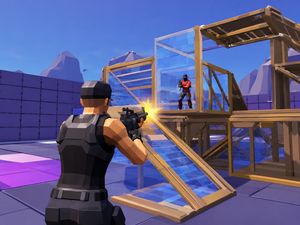
BuildNow GG gameplay
Static Targets Versus Moving Targets
Offline training helps separate aim problems from movement problems. Start with static targets and focus on clean crosshair placement. Fire without rushing, then watch how quickly you can move between targets. This builds control before live opponents add pressure.
Next, work against moving targets in Aim Training. Track their path with small mouse movements instead of large swings. Keep your own movement active while you aim. In a real fight, that habit helps you maintain pressure while changing cover or height.
Training becomes useful when it matches a match decision. Static work supports calm shots through edits. Moving work supports shots taken during a push, retreat, or jump.
Training for Faster Crosshair Reads
Use Aim Training to read target movement earlier. Watch the direction first, then place your crosshair where the target will travel. Avoid chasing every sudden change with your mouse. Small corrections keep your aim ready for the next opening.
Mix short tracking bursts with quick target switches. Then repeat the drill after building a wall or ramp. That extra step makes the read closer to a real BuildNow GG exchange.
Building and Aim as One Habit
Pair every shot with a movement choice. Build cover before a risky peek, edit when your crosshair reaches the opening, and move after firing. Offline training should rehearse that full chain. Aim alone is not enough when a live opponent can build back.
Keep the sequence simple: protect, read, shoot, relocate. Repeat it until each action feels connected.
Try BuildNow GG here now and turn those drills into live fights.
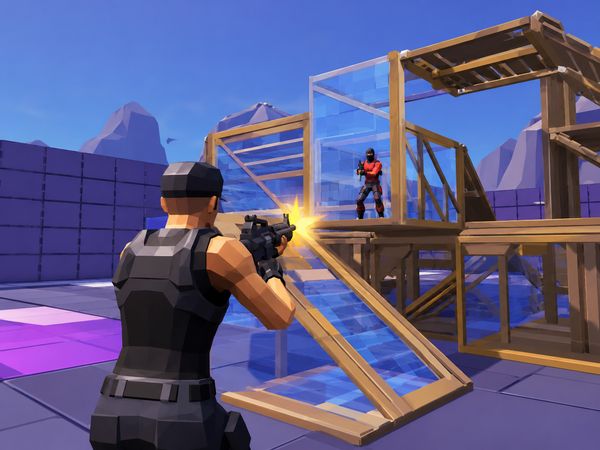
BuildNow GG gameplay
Playing Under Random Zone Pressure
Zone Wars adds shrinking-zone pressure to BuildNow GG gameplay. The zone changes which routes remain safe, so avoid choosing paths only for their height. Watch the available space and move before the closing area forces a desperate sprint.
Build while you rotate, but keep each piece purposeful. A wall can protect a crossing, while a ramp can help you check the route ahead. Do not stop in the open to create a large structure. Keep moving toward the safer side of the zone.
Saving Materials for the Last Circle
Late Zone Wars fights punish wasteful building. Use only the cover needed for each crossing, peek, or height change. A single wall may solve a problem that does not need a full box of pieces.
Keep your edits simple near the final area. Extra changes consume time and can expose your position. Save enough building options for the moment when several players share limited space.
When to Fight and When to Reposition
Fight when an opponent must cross your angle or recover from a poor route. Reposition when the zone removes your cover or forces you into an exposed lane. A short retreat can create a better peek than a rushed shot.
Check the space first. If your next build cannot protect the move, rotate instead.
BuildNow GG on PC and in the Browser
Instant Web Play
BuildNow GG runs directly in the browser as a browser-based online build-and-shoot game. Its Unity WebGL technology supports that web experience. You can enter the game from a compatible browser and use the same core keyboard and mouse layout described above.
The game also supports PC play. That suits players who want a larger screen and precise mouse control for building and shooting. Browser and PC access keep the focus on the match itself, with no separate platform explanation needed before you start.
BattleLab lists BuildNow GG across browser, PC, and Android platforms. The browser version remains the most immediate option for a quick session. Open the game, choose your activity, and begin practicing movement, edits, or aim.
Why Browser Access Fits Short Sessions
Each session gives you a clear chance to refine one decision.
✨ Key Features of BuildNow GG
- Real-time building
- Third-person shooting
- Aim Training
- Zone Wars
- 1v1 duels
- Offline training
How to Play BuildNow GG
Step 1: Use the game controls
Use Spacebar to jump. Use Q to build wall. Use C to build floor. Use V to build ramp.
Step 2: Learn the build keys first
Use the wall, floor, ramp, and roof binds until they feel automatic.
Step 3: Pair every build with a peek
Place cover, then shoot from a safer angle before resetting your position.
Step 4: Use edits to keep momentum
Edit quickly when a wall blocks your shot or when a route opens.
Step 5: Win with pressure, not panic
Force the opponent to react to your build pace, then punish hesitation.
BuildNow GG FAQs
Can I play BuildNow GG on mobile devices?
Yes. BuildNow GG has a mobile release through Google Play.
Conclusion
BuildNow GG, developed by BattleLab with Unity WebGL, delivers a focused build-and-shoot shooter experience in the browser, on PC, and on Android. Its appeal comes from combining weapon use with hands-on construction, letting players build walls, floors, ramps, and roofs before editing them with the dedicated controls. This gives every encounter a creative layer without taking attention away from the action.
The control scheme is clear and practical: Spacebar handles jumping, Q, C, V, and Left Shift build structures, F edits, Z selects the pickaxe, and keys 1 through 5 switch weapon slots. Left Click fires, while Right Click aims or resets an edit. Emotes, chat, and the scoreboard are also easily accessible. Try BuildNow GG and play right here on this page.

No comments yet. Be the first to share your thoughts!