Ragdoll Playground turns loose ragdolls, weapons, vehicles, and objects into fast physics experiments. Place something in an open environment, then watch collisions and force shape the result. Nothing tells you what to build next.
This physics sandbox has no story, missions, score, or fixed campaign path. Your goal comes from the setup itself. Test a placement, change the timing, and compare what happens. The fun grows when a simple scene creates an unexpected chain of movement.
Reggae True Love and WINTERMUTE developed this open-ended simulation. You can play Ragdoll Playground online when the browser build suits you, or use a store version on a supported platform. Start Ragdoll Playground here and make your first experiment.
Ragdoll Playground and Its Physics Sandbox Core
No Story, No Score, No Fixed Goal
Ragdoll Playground gives you no story to follow. It also gives you no missions, score, or fixed campaign path. That removes the usual pressure to complete a stage or chase a target number. Instead, you decide what success means before you begin. You might test how a ragdoll reacts to a vehicle. You might place several objects and study their collisions. You might simply create a strange scene and see whether it behaves as expected. The game does not grade that choice. It leaves the result in your hands. This changes every decision. You choose the objects, their positions, and the moment you activate them. A failed setup still teaches you something. A clean result gives you a new idea.
Why the Sandbox Structure Matters
A fixed mission usually points you toward one answer. This sandbox does the opposite. It makes you think like an experimenter. Start with one object, then change only one detail. Move the ragdoll, rotate the object, or alter the spacing. Small changes can create different collisions. The open environment gives those tests room to develop. Since no score measures your work, careful observation matters more than speed. You learn by comparing scenes and repeating useful setups. That makes the game feel personal. Your best experiment may not resemble another player’s result at all.
What Makes Each Experiment Different
Each scene depends on placement, timing, and the objects you combine. A vehicle can change the space around a ragdoll. A weapon can create a new force to observe. Even a small rotation may alter the next collision. Ragdoll Playground rewards curiosity because every setup starts with your choices.
Spawning Objects, Vehicles, and Weapons
Building a Test Scene
Build a scene from the ground up. Place ragdolls, weapons, vehicles, and other objects inside an open environment. Then give each item enough space for its movement to matter. The core loop stays simple: spawn something, position it, and test the interaction. Use Q to spawn an object facing left, or E to spawn one facing right. Press A or D to rotate the selected object. Drag and select objects with the left mouse button. The middle mouse button pans the camera, while the arrow keys move it. Use the numpad plus and minus keys to zoom. These controls help you frame a scene before testing it. Keep the first setup small. A clear scene makes each collision easier to read.
Choosing the Right Tool for the Job
Choose objects based on the question you want to test. A ragdoll helps you watch movement through the scene. A vehicle adds a moving object and changes the timing. A weapon gives you another way to examine force and collisions. Press F to activate an object. Use the right mouse button to open its context menu. If a placement fails, press Backspace to delete the selected object. Then rebuild that part without disturbing the rest.
When Simple Setups Work Best
Simple scenes reveal more than crowded ones. Spawn one ragdoll and one object first. Watch the contact point and timing. Add another item only after you understand the first interaction. This method keeps cause and effect clear, even when the final scene becomes busy.
Reading Ragdoll Playground Collisions and Force
Gravity and Impact Chains
Gravity gives every scene a constant direction. Objects fall, meet the environment, and collide with anything placed nearby. Watch the first impact, then follow the next movement. A ragdoll may shift after contact, while another object continues toward a new collision. That chain gives the sandbox its character. Do not judge the scene from one instant. Pause with Esc when you need a closer look, then return to the setup and compare the positions. Move the camera with the arrow keys to keep the important contact visible. Zoom with the numpad plus or minus keys when the objects sit close together. Force also matters before the impact happens. A rotated object can meet a ragdoll from a different angle. A vehicle can change the timing of contact. A weapon can introduce another source of force. Test one change at a time. Otherwise, you may not know which placement caused the new result. The best scenes make those links easy to follow. They let you see gravity begin the movement, collisions redirect it, and force carry the chain onward. That makes even a failed experiment useful.
Using Physics to Create Better Outcomes
Start with a clear outcome. You may want one strong collision or a longer chain. Place objects with that result in mind, then activate them with F. Rotate the selected item with A or D before testing. If the force misses, adjust the angle instead of adding several new objects. Use the left mouse button to drag the item into a better position. This keeps your experiment readable. Delete distractions with Backspace, and test again.
Ready to test a new setup? Try Ragdoll Playground right here and see how far one collision can travel.
Ragdoll Playground on Browser and Storefront Builds
Browser Play and No-Download Access
You can begin without installing a store package. The same shared core remains central: spawn objects, place them in an open environment, and test their interactions. Keyboard controls support precise scene work. Mouse controls help you select, drag, pan, and open object menus. Use Tab to toggle side panels, and press Esc for the pause menu or back action. Browser play suits short experiments because you can enter the scene quickly. It also keeps the focus on testing rather than setup.
Mobile Listings and Store Versions
Ragdoll Playground also appears through mobile listings, including Android and iOS versions. Store versions exist alongside browser and PC listings. Steam, Switch, and PlayStation listings also appear among the documented storefront versions.
What Changes Across Platforms
Platform access changes where you launch the game. The documented listings cover browser, Android, iOS, Steam, Switch, and PlayStation. Do not assume that a listing adds missions, scoring, or a new progression system. The supported common ground remains open-ended ragdoll experimentation.
What Players Actually Search For
Ragdoll Playground 2 and Similar Names
There is no Ragdoll Playground 2. Treat that name as separate from the documented game. Several real titles use similar wording, including Melon Sandbox, Ragdoll City Playground, Ragdoll Creator Playground, and Ultimate Ragdoll Playground. Similar names do not prove shared content, controls, or developers. For the game covered here, the reliable identity is the physics sandbox from Reggae True Love and WINTERMUTE. It centers on ragdolls, object spawning, vehicles, weapons, collisions, and force.
Mods, 3D, and Sandbox Variants
Terms such as mods or 3D can point toward a different listing. They do not establish extra features in this Ragdoll Playground game. The supported description stays focused on open environments and ragdoll experiments. Spawn objects, combine them, and observe what the physics produces. Avoid treating a similarly named variant as the same release.
Choosing the Right Version
Choose a storefront listing when you prefer its platform. Either way, identify the title and developer first. Then expect the shared sandbox loop rather than missions or a score.
Answering the Main Player Questions
How Do You Play It?
Start by spawning an object with Q or E. Use the left mouse button to drag or select it. Rotate with A and D, then press F to activate it. Move the camera with the arrow keys, pan with the middle mouse button, and zoom with the numpad plus or minus keys. Use the right mouse button for the object context menu. Press Backspace to delete the selected object, Tab to toggle side panels, or Esc for pause and back.
Can You Play Online?
Yes. Ragdoll Playground also appears on mobile and storefront platforms. The game remains a single-player physics sandbox, so online access means launching the game through the browser rather than entering a multiplayer mode.
What Is It, Really?
Start another experiment now. Open Ragdoll Playground on this page and build a scene worth testing.
✨ Key Features of Ragdoll Playground
- Physics sandbox
- Ragdoll simulation
- Open environments
- Object spawning
- No score
- No missions
How to Play Ragdoll Playground
Step 1: Use the game controls
Use Q to spawn object facing left. Use E to spawn object facing right. Use F to activate object. Use A to rotate object left.
Step 2: Open a build and start experimenting
Load the game and begin in an open sandbox space. There is no campaign to follow, so the first goal is simply creating a setup.
Step 3: Spawn ragdolls and objects
Add ragdolls, tools, weapons, or vehicles into the scene. Start small so you can see how each object behaves.
Step 4: Test one interaction at a time
Trigger one collision, blast, or movement sequence before adding more pieces. Simple tests make the physics easier to read.
Step 5: Build bigger scenarios
Combine multiple objects to create chain reactions.
Step 6: Adjust and repeat
Move objects, rebuild the setup, and try a new arrangement. The game rewards repetition because every layout produces different results.
Ragdoll Playground FAQs
Can I play Ragdoll Playground on mobile devices?
Yes. Ragdoll Playground has a mobile release through Google Play.
Does Ragdoll Playground require a separate installation?
No. The browser version of Ragdoll Playground runs on the page without a separate installation.
Conclusion
Ragdoll Playground is a physics sandbox simulation built around experimentation rather than missions, scoring, or a fixed campaign path. In this single-player experience, you decide what makes a result successful. Spawn ragdolls, weapons, vehicles, and other objects into open environments, then discover what happens through creative combinations, careful placement, and timing.
Its straightforward controls make testing ideas easy: use Q and E to spawn objects, F to activate them, AN and D to rotate them, and Backspace to delete a selected object. Drag objects with the left mouse button, use the arrow keys to move the camera, and adjust your view with Numpad + or -. With no prescribed goal, every setup becomes your own experiment. Play Ragdoll Playground here and start creating your own scenarios.
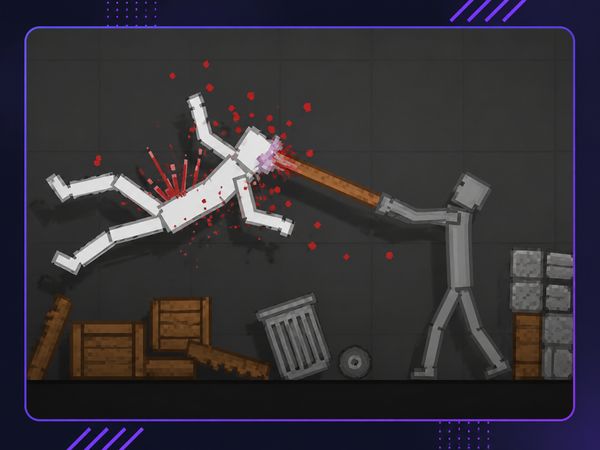
Ragdoll Playground Game Image

No comments yet. Be the first to share your thoughts!