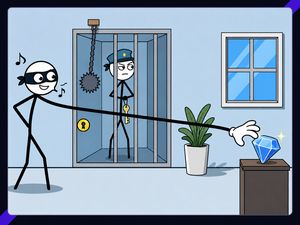
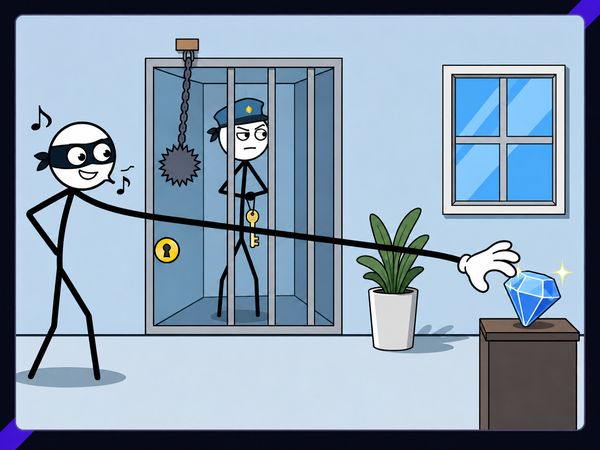
Thief Puzzle turns a stretchy hand into the whole heist. You drag the thief’s arm across each 2D scene, reach the target, and avoid detection. One careless touch can ruin the attempt.
Every puzzle feels like a small route-planning challenge. The goal stays simple, but the path rarely does. Guards, traps, spikes, and barriers force you to read the scene before moving.
Use short drags when the target sits nearby. Trace longer paths when the room leaves no direct opening. Play Thief Puzzle online now and test how carefully you can guide each theft.
Mastering Thief Puzzle’s Hand-Guiding Core
Reading the target route
Start by finding the item you need to steal. Then study the space between the thief and that target. Do not drag immediately. Look for guards, traps, spikes, and hard barriers first.
Trace a safe route with your eyes. Follow the open floor and avoid points where the hand might touch a hazard. A direct line often looks tempting, but it may cross a watchful guard or a dangerous object. Plan the full movement before pressing.
Each stage has a strong one-solution feel. The scene presents a clear target, yet only one route may avoid every threat. Small changes matter. A route that passes above a hazard may fail when dragged through its center. Check the corners, gaps, and turning points.
Think in sections. First, reach the open area. Next, pass the danger. Finally, approach the item from a safe angle. This keeps your movement controlled and reduces rushed corrections.
When to pause and reset
Pause whenever the hand approaches a risky gap. A short stop helps you confirm the next direction. Do not keep dragging through uncertainty. The game rewards careful movement more than frantic speed.
Reset after a failed route instead of repeating the same motion. Remember where contact happened. Then change that exact part of the path. Move around the danger, not merely faster through it.
A reset also clears a bad opening. If your first stretch sends the hand toward a guard, stop early and rethink the angle. Clean attempts begin with clean routes.
Why the hand path matters
The hand is your main tool and your main risk. Its stretched path must reach the target without touching danger. That makes every curve meaningful.
Guide the hand as if you were drawing a safe line. Keep the movement steady. Avoid sharp corrections near hazards, where a small drag can change the result.
Hazards That Break a Clean Theft
Guards and watchful eyes
Guards turn open space into a timing problem. A clear route may still fail if it crosses their view. Watch each guard before you move. Identify the space that appears exposed, then find a safer angle around it.
Do not treat the target as the only important point. The final approach matters just as much. A hand that reaches the item from the wrong side can enter danger at the last moment. Leave room for the hand to curve away.
Use the scene’s layout to separate your route from the guard’s position. Move through open gaps only when they support the full path. If the route feels narrow, slow down and check every section before continuing.
Detection ends the attempt, so a near miss still counts as failure. Keep the hand away from watchful areas rather than trying to squeeze past them. Patient tracing makes the theft repeatable.
Traps, spikes, and barriers
Traps and spikes punish careless contact. They often sit beside the route you want, which makes them easy to clip during a long drag. Mark their position before moving.
Barriers create forced turns. Follow the available opening instead of pulling through the obstacle. When a passage looks tight, use a slower, smaller movement. The safest route may add distance, but distance matters less than avoiding contact.
Check the hand’s whole route, not only its starting point. A safe beginning can still end at a spike.
Using the scene as cover
Scene layout helps hide risky movement. Place barriers between the hand and danger when the route allows it. Use open pockets to pause and adjust.
Cover does not remove the hazard. It only gives your route more space. Keep tracing until the target path stays clear.
Thief Puzzle Controls Across Browser and Mobile
Why precise dragging wins
This input matches the game’s central idea: your cursor draws the route that the hand follows.
On a browser, press the left mouse button on the hand or its starting point. Keep holding it while you guide the route. Release only after the hand reaches the target safely. Short, deliberate movements give you better control than wide sweeps.
Start slowly on unfamiliar scenes. Drag toward the first open space, then continue after checking the next hazard. This creates natural pauses without breaking your plan.
Browser play suits players who prefer a visible cursor and steady mouse control. That makes a quick puzzle attempt easy to start.
Mobile listings use the same core hand-guiding idea, but the screen replaces the mouse pointer. Touch dragging gives you direct control over the route. Keep your finger movement smooth and avoid covering the target for too long. Lift only when the path reaches a safe endpoint.
Try Thief Puzzle here and turn one careful drag into a successful theft.
Level Design and Difficulty Progression
Early tutorial-style scenes
Early scenes teach the hand route through simple layouts. The target usually stands out, while the danger remains easy to read. These stages help you learn how far the thief’s arm can stretch and how dragging shapes its movement.
Use them to build good habits. Study the target, scan the route, and avoid rushing. Even a basic puzzle rewards a clean line. Treat each early theft as practice for tighter spaces later.
Later multi-obstacle puzzles
Later stages add more obstacles and tighter timing. Guards may control important parts of the route, while traps, spikes, and barriers reduce your options. One safe movement may create a difficult next step.
Break the route into smaller parts. Confirm each opening before crossing it. A longer path often works better than a direct line.
Why later levels feel harder
Difficulty rises because the scene demands more decisions. You must judge direction, distance, and danger together. A tiny error near the target can undo a strong opening.
Thief Puzzle spans hundreds of levels, giving the core idea a long puzzle ladder. The challenge comes from changing layouts, not from changing the basic control.
Thief Puzzle Versions, Platforms, and Access
Browser version
The browser version brings the core theft puzzle directly to your screen.
Browser play keeps the focus on quick attempts. Open a scene, read the route, and start dragging when the path looks safe. The central mechanics remain the same: steal the item while avoiding detection.
Android and iOS listings
Thief Puzzle began as a mobile puzzle release. Android and iOS listings carry the same core premise, built around stretching the thief’s hand toward an item.
Touch movement replaces the mouse action on mobile. The key challenge remains unchanged: guide the hand accurately through each theft scene.
Switch and PlayStation releases
The game also appears across console listings. These releases place the same theft-and-avoidance premise on console platforms, including Switch and PlayStation listings.
Across its documented platforms, Thief Puzzle stays a singleplayer logic puzzle. Its identity comes from the stretchy hand, guarded targets, and hazardous routes.
What Players Notice in Reviews and Ratings
Simple and addictive play
Thief Puzzle makes its main action clear quickly. Stretch the hand, reach the item, and avoid detection. That simple loop supports short attempts and immediate retries.
The appeal comes from fast understanding. You do not need a large control set. One dragging action creates the puzzle.
That simplicity also makes each successful theft feel earned. The route looks obvious only after you solve it.
Humor and brain-teaser appeal
The thief’s stretchy hand gives ordinary theft scenes a playful twist. The strange movement adds humor without hiding the puzzle goal.
At the same time, every stage asks a real logic question: which path reaches the item safely? That mix keeps the game lighter than a serious stealth title while preserving its brain-teaser core.
The tradeoff of easy entry
Thief Puzzle welcomes new players with one clear action. That easy entry helps you start solving immediately.
Later scenes demand more care, though. Simple controls do not mean simple routes. Guards, traps, spikes, and barriers can make a short drag surprisingly difficult.
The result is a focused puzzle game. Its rules stay readable, while the hand paths keep testing your judgment.
✨ Key Features of Thief Puzzle
- Stretchy hand puzzle
- Stealth-based theft scenes
- Guard avoidance
- Trap dodging
- Multi-platform releases
How to Play Thief Puzzle
Step 1: Use the game controls
Use Left Click + Drag to stretch / Guide thief's hand.
Step 2: Study the room first
Look at the target item, the guards, and every obstacle before moving.
Step 3: Trace a safe hand path
Draw or guide the thief’s hand through open space, not through danger.
Step 4: Avoid detection
Keep the hand away from guards and anything that would stop the theft.
Step 5: Reset failed routes quickly
If the path collides with a hazard, restart mentally and try a cleaner angle.
Step 6: Use tighter routes later
Later stages ask for more careful timing and more precise movement.
Thief Puzzle FAQs
Does Thief Puzzle require a separate installation?
No. The browser version of Thief Puzzle runs on the page without a separate installation.
What are the tips and tricks for Thief Puzzle?
Study the full hand path before moving. Watch for guards, traps, and barriers, then test a route that avoids them. If the path gets messy, reset early and try a cleaner line.
Is Thief Puzzle safe?
The evidence supports it as a normal puzzle game available through major app stores and browser portals. As with any version, the safest choice is the official or store listing for your platform.
Conclusion
Thief Puzzle is a focused logic puzzle built around a simple but engaging interaction: stretching and guiding the thief’s hand with a left-click drag. That direct control makes each puzzle feel hands-on, while the singleplayer format lets you think through the action at your own pace. Its clean premise and easy-to-understand input make it approachable without taking away from the satisfaction of finding the right solution.
Available in the browser, Thief Puzzle is a convenient choice when you want a compact test of reasoning and precision. The combination of logic-based play and intuitive mouse control keeps the experience clear, interactive, and rewarding. If you enjoy working out solutions through careful hand movement, play Thief Puzzle here and see how cleverly you can guide the thief’s hand.

No comments yet. Be the first to share your thoughts!