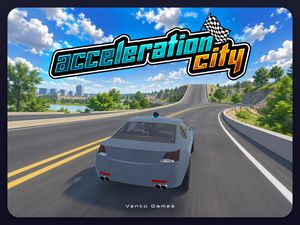
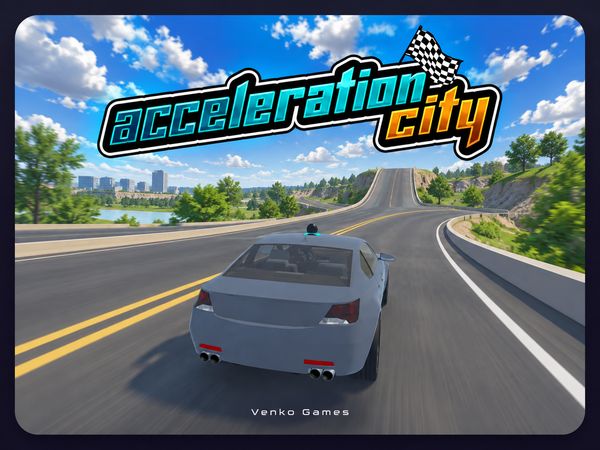
Acceleration City hands you a car, a futuristic skyline, and a robot buddy who builds the road you need right when you need it. Forget lap timers and locked tracks. You drive wherever you can find a way to go, and when there is no way, your partner makes one.
The game came out of a research project at Carnegie Mellon Robotics Academy, built together with students from the Boys and Girls Clubs of Western Pennsylvania. It runs directly in the browser as a Unity WebGL build, so there is nothing to install. You can play Acceleration City online and jump straight into the city.
This guide covers how the open world works, how to use your CoBot, how the car handles, and where to hunt for hidden collectibles. Ready to roll? Start playing Acceleration City now and test each tip as you read.
What Is Acceleration City?
Open-World Stunt Driving
Acceleration City is an arcade racing game with an exploration twist. You drive through a futuristic digital metropolis instead of following a fixed route from start to finish. Roads end in sudden drop-offs. Elevated speedways loop above the streets. Jump pads launch you toward rooftops you can see but cannot reach on foot.
That freedom changes how you think. Where do you want to go next? The answer is rarely "straight ahead." You scan the skyline, pick a target, and work out how to get there with speed, a jump, and a little help from your robot partner.
Handling rewards a calm hand. Steady throttle control keeps you on narrow lanes, and smooth transitions let you move from street cruising to mid-air maneuvering without losing your line. Jumping is built in, so you can hop bumps, clear chasms, and pull acrobatics in the air.
The game is singleplayer, so every route you find is your own. Crashes do not stall you for long either, since vehicle recovery is quick and keeps the run flowing. Experiment, fail fast, and try again.
Educational Research Origins
The game was built as part of the Player-Programmed-Partner Games (P3G) project, an effort aimed at educational STEM outreach. Academic researchers at Carnegie Mellon worked side by side with students from the Boys and Girls Clubs of Western Pennsylvania to design it.
Carnegie Mellon Robotics Academy later featured Acceleration City as a cornerstone activity during international Hour of Code events. The result is a driving game that invites experimentation and problem-solving, with a robot partner at the center of the design.
Deploying Your CoBot Partner in Acceleration City
Dynamic Ramp and Platform Construction
The CoBot is the heart of the game. This interactive robot companion builds ramps and platforms in real time, so a dead end stops being a dead end. Hit a broken bridge span or a wide chasm, and you can call your partner to fabricate a way across.
Press the E key to call your CoBot for a boost, ramp, or trick. The timing matters. Call too early and the structure appears behind you or below your wheels. Call too late and you are already falling. A good habit is to approach the gap at a speed you can control, then trigger the CoBot just as you reach the edge.
Because the course edits itself on demand, you keep your forward momentum. You do not need to stop, reverse, and hunt for another path. Think of every gap as a question, and the CoBot as one possible answer.
Pair the E key with the Space Bar. Space jumps over bumps or hits ramps, and combining a jump with a freshly built platform opens up routes that plain driving never reaches.
Tactical Boosts and Recovery
Your CoBot does more than build. It also gives performance boosts at key moments. Trigger it while rolling up a steep incline and you pick up extra velocity, which helps you clear tall structures that would otherwise stop you short.
It also helps on the way down. Uneven landings can send a car spinning, and the CoBot steadies the vehicle's rotation. Learning when to summon it is the skill that gets you onto rooftops and hidden highway branches.
Handling and Vehicle Control Mechanics
Managing Momentum and Braking
Steer with the WASD keys or the Arrow keys. Both steer, accelerate, and brake, so use whichever feels better under your fingers.
Speed builds fast on flat pavement. That sounds great until you reach a narrow, elevated turn. Brake before the corner, not during it. Hitting a curb at high velocity causes a severe bounce, and one bad bounce can throw your car completely off course.
Tap your direction keys in short, smooth inputs rather than holding them down. Small corrections keep the car settled. Big, constant steering makes it wobble, especially at speed. If a stretch of road feels twitchy, ease off the throttle for a moment and let the car find its balance before you push again.
Mid-Air Corrections and Camera Views
Launching off a ramp changes the physics, so expect the car to behave differently in the air. Use that time to plan your landing instead of just hoping.
Press the C key to change camera angle. You can switch views on the fly to check the landing strip below or to spot distant targets ahead. Try a different view on a tricky jump and see which one gives you the clearest picture.
Tracking Down Minanimals Across the City
Rooftop Exploration Routes
Stick to the streets and you will miss most of them.
Look up. Scan the skyline for ledges and perches, then plan a vertical route to reach them. Tough spots often need a multi-stage plan. Build speed on flat ground, hit a launch ramp, and call your CoBot mid-flight with the E key to create a platform you can land on.
Take it one sector at a time. Work through a district slowly, note which perches you cannot reach yet, and return when you have a better idea. Want another challenge? Try Acceleration City right here and chase a rooftop you skipped earlier.
Hidden Architectural Secrets
Some of the best finds hide behind the buildings themselves. Difficult landings can reveal secret paths tucked behind skyscrapers. Pay attention to odd angles, narrow ledges, and gaps between structures. Experimental routing pays off here, so try the strange jump instead of the obvious one.
How a Run Ends in Acceleration City
Open-Ended Stunt Sessions
One minute you might hunt for a Minanimal on a distant rooftop. The next you might just practice a jump until it feels perfect.
That makes it easy to learn at your own pace. Keep a goal in mind, such as one stubborn ledge or one tricky chasm, and keep testing until you land it. Try a different speed, a different CoBot timing, or a different camera view each time. Small changes teach you fast.
Out-of-Bounds Resets and Hazard Recovery
Browse more racing games when you want to switch things up.
✨ Key Features of Acceleration City
- Open-world stunt driving through a futuristic digital metropolis
- Real-time CoBot companion that constructs ramps, platforms, and speed boosts
- Hidden Minanimal collectibles tucked across high-altitude rooftops and alcoves
- Responsive jumping mechanics allowing mid-air acrobatics and chasm jumps
- Instant vehicle recovery that keeps gameplay flowing smoothly after crashes
- Multiple camera angles toggled on the fly for better jump navigation
How to Play Acceleration City
Step 1: Use the game controls
Use WASD Keys to steer, accelerate, and brake. Use Arrow Keys to steer, accelerate, and brake. Use Space Bar to jump over bumps or hit ramps. Use E Key to call your CoBot for a boost, ramp, or trick.
Step 2: Launch the Game
Allow the Unity WebGL player to initialize in your browser and press start to load into the city.
Step 3: Accelerate and Steer
Use the WASD or Arrow keys to navigate your car onto the main roadway and build up initial cruising speed.
Step 4: Summon Your CoBot
Press the E key when approaching large gaps or vertical drops to deploy your robotic partner for ramps and boosts.
Step 5: Execute High Jumps
Hit the Space Bar right before launching off stunt ramps to maximize aerial hang time and elevation.
Step 6: Collect Hidden Minanimals
Search upper highway sections and elevated ledges to locate every collectible creature hiding across the urban map.
Acceleration City FAQs
What are the basic controls for Acceleration City?
Browser keyboard: WASD Keys — steer, accelerate, and brake; Arrow Keys — steer, accelerate, and brake; Space Bar — jump over bumps or hit ramps; E Key — call your cobot for a boost, ramp, or trick; C Key — change camera.
Can I play Acceleration City on mobile devices?
Acceleration City opens in a phone browser, but it is played with the keyboard, so a computer works best.
Do I need to download Acceleration City?
No. Acceleration City runs in your browser on this page, with nothing to download or install.
How does a driving session end in Acceleration City?
Runs are open-ended exploration sessions without standard game-over screens or countdown timers. A session ends whenever you choose to leave, while falling off roads simply respawns your car on nearby pavement.
What role does the CoBot play during gameplay?
The CoBot is your robotic companion activated by pressing the E key. It constructs instant ramps and platforms to cross large gaps, stabilizes your vehicle, and provides speed boosts.
Conclusion
Acceleration City from Carnegie Mellon Robotics Academy blends arcade racing with exploration, all running right in your browser. You can steer, accelerate, and brake with WASD or the arrow keys, jump over bumps or hit ramps with the Space Bar, and switch your view with the C key.
What makes it stand out is the E key, which calls your CoBot for a boost, a ramp, or a trick. It's a fun twist on the racing formula, and it's easy to pick up as a singleplayer experience.
Ready to hit the streets? Start playing Acceleration City here on this page and see how far your driving skills can take you.
Acceleration City Game Image

No comments yet. Be the first to share your thoughts!